 We have been seeing a possible pattern with Apple Pay transactions on Friday evenings, especially between 5:00 PM and 10:00 PM Eastern Time. During busy times, some Apple Pay payments may fail, time out, or look like they were approved when the transaction was not actually completed. How to Check the PaymentOn the POS:
If the Apple Pay transaction is not listed on the terminal, the payment was not completed and you will not be paid for that transaction. What to Tell the CustomerIf the customer shows that the money was taken from their Apple Pay account, let them know that the payment may only be a temporary authorization. You can tell the customer: “The payment did not complete on our terminal. Apple or your bank should return the pending amount to your account.” Please do not charge the customer again until you first check the terminal’s Last Transactions list. We are continuing to review this issue because it appears to happen more often during busy Friday evening hours. 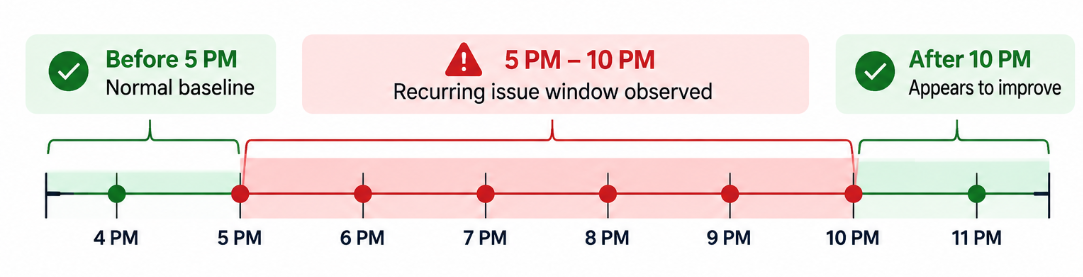 below is from downdetector. 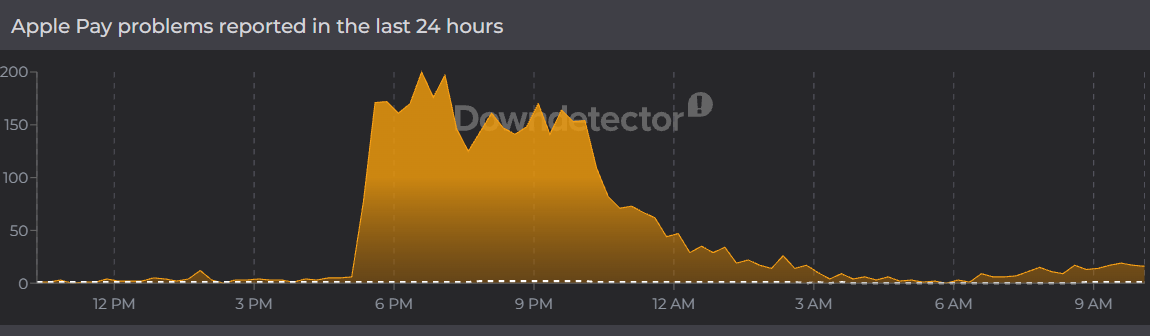 |